Is a powerful, lightweight, and high-performance .NET MAUI control designed to automatically highlight specific text matches within a string. Perfect for search autocomplete lists, filter systems, and real-time query suggestions. Features seamless data binding, case-insensitive evaluation via optimized Regex tokenization, custom highlight coloration, bold emphasis triggers, and cross-platform layout rendering without UI thread blocking or performance degradation in large text and large CollectionViews.


Preview
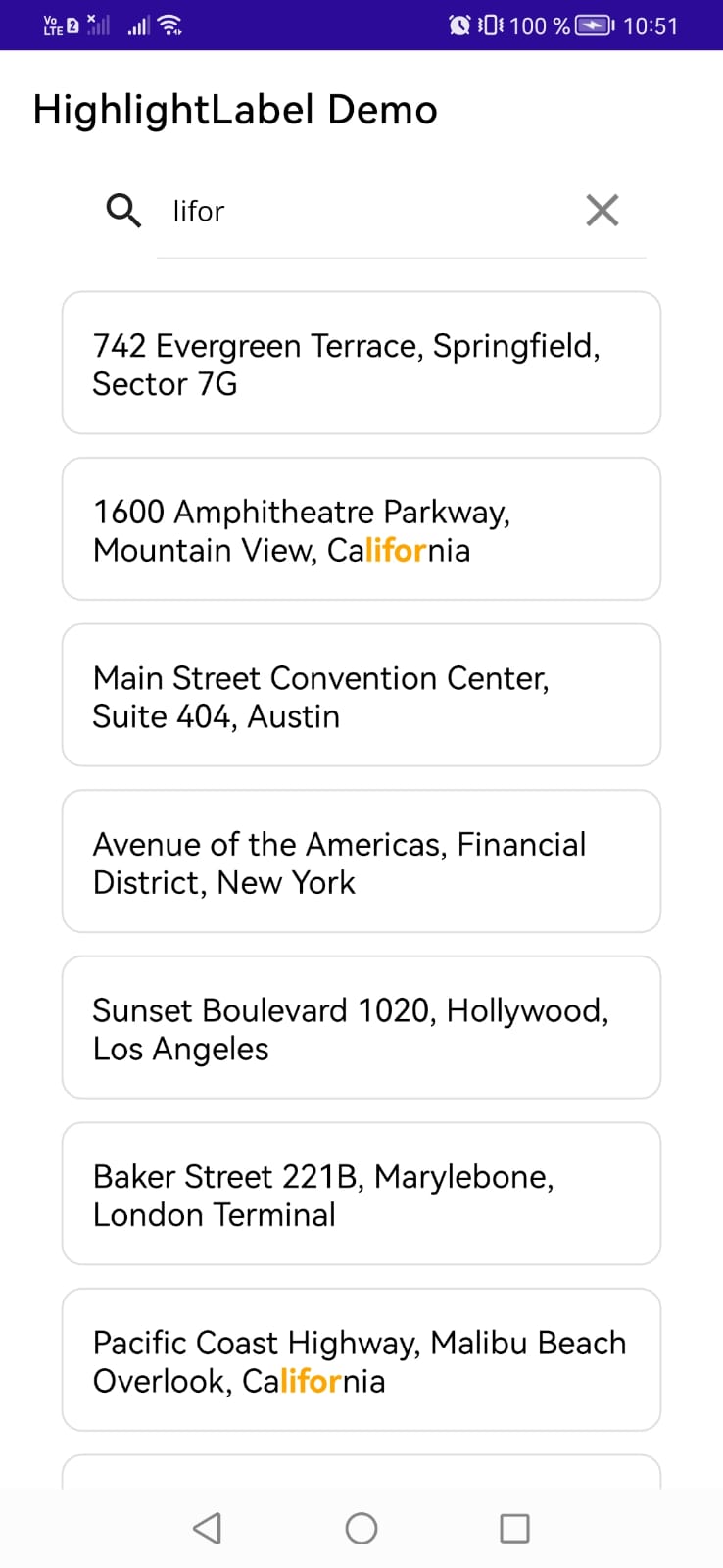
Features ✨
- Dynamic Text Highlighting — Automatically search, tokenize, and highlight matching text sequences within any raw string input in real time.
- Case-Insensitive Matching — Robust, case-insensitive query processing ensures accurate visual feedback regardless of user typing style.
- Custom Highlight Styling — Full native support to define custom highlight colors for matched tokens.
- Safe-Fail Tokenization — Built-in Regex evaluation guardrails that sanitize text inputs and prevent application crashes caused by unexpected special characters or API string changes.
- Native Property Inheritance — Seamlessly inherits and respects standard .NET MAUI Label properties including custom FontFamilies, FontSize, and default TextColors for unmatched segments.
Installation 📦
Add the NuGet package to your .NET MAUI project:
dotnet add package HighlightLabel.Maui
Quick Start 🚀
1. Add the control to your XAML
Register the namespace and drop the control into your layout:
<?xml version="1.0" encoding="utf-8" ?>
<ContentPage xmlns="http://schemas.microsoft.com/dotnet/2021/maui"
             xmlns:x="http://schemas.microsoft.com/winfx/2009/xaml"
             x:Class="Sample.HighlightLabel.Maui.MainPage"
             xmlns:viewModels="clr-namespace:Sample.HighlightLabel.Maui.ViewModels"
             xmlns:highlightLabel="clr-namespace:HighlightLabel.Maui.Controls;assembly=HighlightLabel.Maui"
             xmlns:toolkit="http://schemas.microsoft.com/dotnet/2022/maui/toolkit"
             xmlns:local="clr-namespace:Sample.HighlightLabel.Maui.Models">

    <ContentPage.BindingContext>
        <viewModels:MainPageViewmodel/>
    </ContentPage.BindingContext>

    <ScrollView>

        <Grid
            Padding="30,0"
            RowSpacing="10"
            RowDefinitions="Auto,*">

            <SearchBar
                x:Name="SearchBarText"
                Text="{Binding SearchText}"
                Placeholder="Type 'conven', 'avenue' or 'street'..."
                CancelButtonColor="Gray">

                <SearchBar.TextColor>

                    <OnPlatform x:TypeArguments="Color">

                        <On Platform="Android">Black</On>

                    </OnPlatform>

                </SearchBar.TextColor>

                <SearchBar.PlaceholderColor>

                    <OnPlatform x:TypeArguments="Color">

                        <On Platform="Android">Black</On>

                    </OnPlatform>

                </SearchBar.PlaceholderColor>

                <SearchBar.Behaviors>

                    <toolkit:EventToCommandBehavior
                        EventName="TextChanged"
                        BindingContext="{Binding Path=BindingContext, Source={x:Reference SearchBarText}, x:DataType=SearchBar}"
                        Command="{Binding SearchCommand}"/>

                </SearchBar.Behaviors>

            </SearchBar>

            <CollectionView
                Grid.Row="1"
                ItemsSource="{Binding Addresses}">

                <CollectionView.ItemTemplate>

                    <DataTemplate x:DataType="local:AddressItem">

                        <Border
                            Margin="0,5"
                            Padding="15"
                            StrokeShape="RoundRectangle 10,10,10,10"
                            Stroke="#E0E0E0">

                            <StackLayout>

                                <highlightLabel:HighlightLabel
                                    SourceText="{Binding FullAddress}"
                                    TextToHighlight="{Binding SearchText, Source={x:RelativeSource AncestorType={x:Type viewModels:MainPageViewmodel}}, x:DataType={x:Type viewModels:MainPageViewmodel}}"
                                    HighlightColor="Orange"
                                    FontSize="16"
                                    TextColor="Black" />

                            </StackLayout>

                        </Border>

                    </DataTemplate>

                </CollectionView.ItemTemplate>

            </CollectionView>


        </Grid>

    </ScrollView>

</ContentPage>
2. Setup your code behind or viewmodel 🛠️
Setup for MainPageViewmodel example:
using System.Collections.ObjectModel;
using System.ComponentModel;
using System.Runtime.CompilerServices;
using System.Windows.Input;

namespace Sample.HighlightLabel.Maui.ViewModels
{

    public class AddressItem
    {
        public string FullAddress { get; set; }
    }

    public class MainPageViewmodel : INotifyPropertyChanged
    {
        public event PropertyChangedEventHandler? PropertyChanged;
        protected virtual void OnPropertyChanged([CallerMemberName] string propertyName = null)
        {
            PropertyChanged?.Invoke(this, new PropertyChangedEventArgs(propertyName));
        }

        private string _SearchText = string.Empty;
        public string SearchText
        {
            get { return _SearchText; }
            set
            {
                if (_SearchText != value)
                {
                    _SearchText = value;
                    OnPropertyChanged();
                }
            }
        }

        private ObservableCollection<AddressItem> _Addresses = new ObservableCollection<AddressItem>();
        public ObservableCollection<AddressItem> Addresses
        {
            get { return _Addresses; }
            set
            {
                if (_Addresses != value)
                {
                    _Addresses = value;
                    OnPropertyChanged();
                }
            }
        }

        public ICommand? SearchCommand { get; set; }

        public MainPageViewmodel()
        {
            SearchCommand = new Command(
            execute: async () =>
            {
                await OnSearchCommand();
            });
            LoadData();
        }

        private async Task OnSearchCommand()
        {
            try
            {

                if (string.IsNullOrEmpty(SearchText))
                {
                    return;
                }

                SearchText = SearchText.ToLower();

            }
            catch (Exception e)
            {
                Console.WriteLine(e);
                throw;
            }

        }

        private void LoadData()
        {
            Addresses = new ObservableCollection<AddressItem>
            {
                new AddressItem { FullAddress = "742 Evergreen Terrace, Springfield, Sector 7G" },
                new AddressItem { FullAddress = "1600 Amphitheatre Parkway, Mountain View, California" },
                new AddressItem { FullAddress = "Main Street Convention Center, Suite 404, Austin" },
                new AddressItem { FullAddress = "Avenue of the Americas, Financial District, New York" },
                new AddressItem { FullAddress = "Sunset Boulevard 1020, Hollywood, Los Angeles" },
                new AddressItem { FullAddress = "Baker Street 221B, Marylebone, London Terminal" },
                new AddressItem { FullAddress = "Pacific Coast Highway, Malibu Beach Overlook, California" },
                new AddressItem { FullAddress = "Broadway Avenue Theater District, New York City" },
                new AddressItem { FullAddress = "Industrial Park Road, Tech Innovation Hub, Seattle" },
                new AddressItem { FullAddress = "Convention Road Intersection, Commercial Zone, Chicago" }
            };
        }
    }
}
Contributing 🤝
Contributions, issues, and feature requests are welcome! Feel free to check the issues page or open a pull request.
Support the Project ☕
If this component saves you development time or streamlines your dynamic text workflows, feel free to drop a star on the repository! ⭐
- NuGet URL: Highlightlabel.Maui Packages
- Project Support: Support on Ko-fi